
Interfacing Barcode Scanner to Microcontroller
20 November 2015
3 min read
43119 views
So what exactly is a Barcode scanner? A barcode scanner also called as Barcode Reader is an electronic device that reads barcodes. It basically consists of a light source, a lens and a light sensor which translates the optical signals into electrical ones. Most common type of Barcode Scanner uses Laser as a Light Source and a photodiode as a sensor that is used to measure the intensity of the light reflected back from the bar code.
I have seen lots of Microcontroller projects online based on RFID readers, Mifare Readers but almost no projects based on barcode Scanners. So I wondered why it is so. I researched and found that barcode scanners are costly compared to RFID readers and all barcode scanners have USB output. From the research I came to the conclusion that Scanners having USB output makes it very complex to interface with simple low cost microcontrollers like 8051, PIC or AVR microcontroller. Thus making it complicated for students to integrate them into their project. But the distinct advantage of using barcode over RFID is the cost of the Barcode as compared to RFID Tags. You can just simply print out a barcode so its price is almost negligible where as RFID tags cost you couple of rupees so when you have large inventory Barcode will be cost effective for you.
To avoid the complexity of adding a USB Barcode Scanner into your embedded project we can use this Barcode Scanner with RS232 Serial Output. The most important advantage of using this type of barcode scanner is it can be interfaced to any Microcontroller which has serial output or even to Arduino via MAX232 IC. As the output of the Barcode scanner is RS232 we will require MAX232 IC to convert the RS232 voltage levels to TTL level to be interfaced to Microcontroller. It can also be connected directly to PC’s serial port and the scanned data can be viewed on hyperterminal (How to set Hyperterminal for 9600 baud rate) or any other serial monitoring software at 9600 baud rate.
Below
you can see how we can interface the Serial Barcode Scanner to an 8051 based microcontrollers. Over here we have used 89s52 Microcontroller
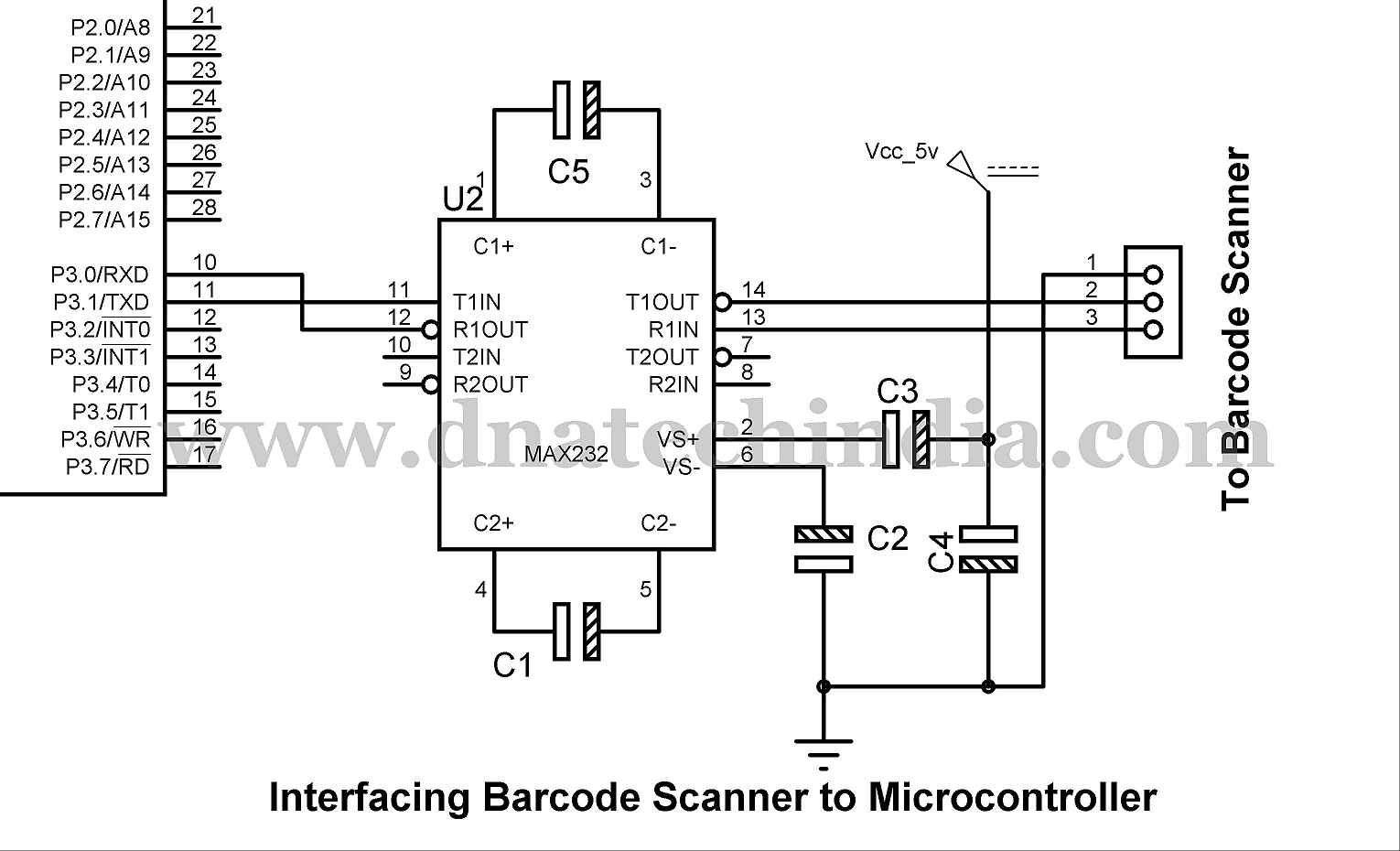
As
you can see we have used MAX232 IC for converting RS232 output of Barcode
Scanner into TTL signal which is compatible with the Microcontroller. It is
then connected to the serial Port i.e. P3.0 & P3.1 pin of the 89s52
Microcontroller. Using simple Serial Communication Coding you can get the scanned
data from the Barcode Scanner. Using
same MAX232 circuit you can connect the Barcode scanner to PIC Microcontroller,
AVR, Arduino or any other microcontroller which has serial port.
Well that was very simple wasn’t it? Now you can easily integrate Barcode scanner into your embedded project. And if you have any queries you can always get in touch with us.