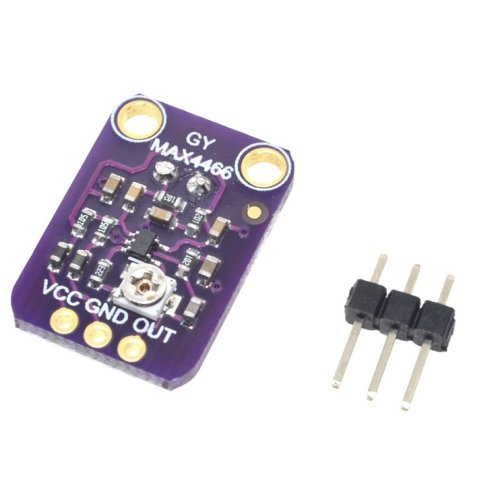
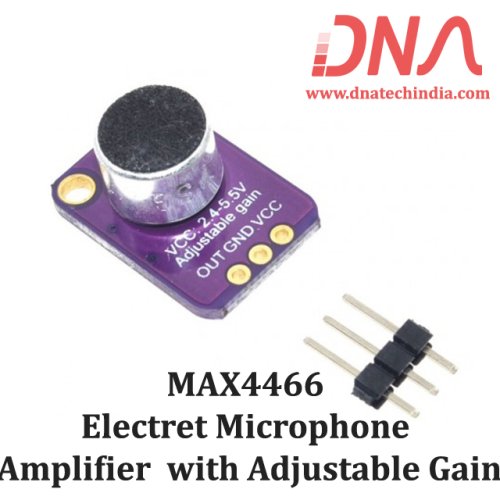
This module is based on Maxims MAX4466 Microphone Pre-amplifier IC.
MAX4466 module has simplified amplifying electret microphone signal. This fully assembled and tested board comes with a 20-20KHz electret microphone soldered on. For the amplification, we use the Maxim MAX-4466, an op-amp specifically designed for this delicate task! The amplifier has excellent power supply noise rejection, so this amplifier sounds really good and isn't nearly as noisy or scratchy as other mic amp breakouts we've tried!
MAX4466 breakout is best used for projects such as voice changers, audio recording/sampling, and audio-reactive projects that use FFT. On the back, we include a small trimmer pot to adjust the gain. You can set the gain from 25x to 125x. That's down to be about 200mVpp (for normal speaking volume about 6" away) which is good for attaching to something that expects 'line level' input without clipping, or up to about 1Vpp, ideal for reading from a microcontroller ADC. The output is rail-to-rail so if the sounds gets loud, the output can go up to 5Vpp!
Using it is simple: connect GND to ground, VCC to 2.4 to 5 Volt DC. For the best performance, use the "quietest" supply available (on an Arduino, this would be the 3.3 Volt supply). The audio waveform will come out of the OUT pin. The output will have a DC bias of VCC/2 so when its perfectly quiet, the voltage will be a steady VCC/2 volts (it is DC coupled). If the audio equipment you're using requires AC coupled audio, place a 100uF capacitor between the output pin and the input of your device. If you're connecting to an audio amplifier that has differential inputs or includes decoupling capacitors, the 100uF cap is not required.
The output pin is not designed to drive speakers or anything but the smallest in-ear headphones - you'll need an audio amplifier (such as our 3.7 Watt stereo amp) if you want to connect the amp directly to speakers. If you're connecting to a microcontroller pin, you don't need an amplifier or decoupling capacitor - connect the OUT pin directly to the microcontroller ADC pin.
We have Various sizes of Audio, Sound and Voice Module. Check out our complete collection of Audio, Sound and Voice Module.
If you are in Nashik you can buy this Electronic Component at our local shop at New CBS, Nashik or you can place order online and get it delivered at your doorstep anywhere in India. |
See 1 Ratings & Reviews |
This module is based on Maxims MAX4466 Microphone Pre-amplifier IC.
MAX4466 module has simplified amplifying electret microphone signal. This fully assembled and tested board comes with a 20-20KHz electret microphone soldered on. For the amplification, we use the Maxim MAX-4466, an op-amp specifically designed for this delicate task! The amplifier has excellent power supply noise rejection, so this amplifier sounds really good and isn't nearly as noisy or scratchy as other mic amp breakouts we've tried!
MAX4466 breakout is best used for projects such as voice changers, audio recording/sampling, and audio-reactive projects that use FFT. On the back, we include a small trimmer pot to adjust the gain. You can set the gain from 25x to 125x. That's down to be about 200mVpp (for normal speaking volume about 6" away) which is good for attaching to something that expects 'line level' input without clipping, or up to about 1Vpp, ideal for reading from a microcontroller ADC. The output is rail-to-rail so if the sounds gets loud, the output can go up to 5Vpp!
Using it is simple: connect GND to ground, VCC to 2.4 to 5 Volt DC. For the best performance, use the "quietest" supply available (on an Arduino, this would be the 3.3 Volt supply). The audio waveform will come out of the OUT pin. The output will have a DC bias of VCC/2 so when its perfectly quiet, the voltage will be a steady VCC/2 volts (it is DC coupled). If the audio equipment you're using requires AC coupled audio, place a 100uF capacitor between the output pin and the input of your device. If you're connecting to an audio amplifier that has differential inputs or includes decoupling capacitors, the 100uF cap is not required.
The output pin is not designed to drive speakers or anything but the smallest in-ear headphones - you'll need an audio amplifier (such as our 3.7 Watt stereo amp) if you want to connect the amp directly to speakers. If you're connecting to a microcontroller pin, you don't need an amplifier or decoupling capacitor - connect the OUT pin directly to the microcontroller ADC pin.
We have Various sizes of Audio, Sound and Voice Module. Check out our complete collection of Audio, Sound and Voice Module.
If you are in Nashik you can buy this Electronic Component at our local shop at New CBS, Nashik or you can place order online and get it delivered at your doorstep anywhere in India. |